
README.md generated from https://rcmisk.com/master-claude-code-starter-prompt-for-a-backend-first-content-generation-api
Lover of coding, software development/engineering, indie hackers podcast/community, start-ups, music, guitar, technology, fitness, running, biking, learning new things, travel, the beach, and hiking/mountains.
As a kid I had too many interests. I grew up playing soccer from an early age and played through college! Sports and being a part of a team was always part of my DNA. Not only did I value sports and competition but I loved music, art, drawing, animation, film, computers, math, and learning.
Once I hit college, the decision to choose my life path was paralyzing, and ultimately led me down many different paths. I explored economics, finance, psychology, philosophy, statistics, communications, and marketing. I graduated with a finance degree and thought the data science, statistics, and the trends and patterns would be a fun career, however my first entry level job in the industry discouraged me to continue in the industry and to explore other paths.
I always had an itch to build and start something on my own or with family. Growing up I started a lawn mowing business, shoveling business, lemonade stands, and small Wordpress websites. I loved the creativity of coming up with ideas on how to help people and make money at the same time.
I realized I loved technology, and seeing what could be created and started with technology really urged me to start down the path of learning how to code. My brother and I had an idea for a college social network (similar to Facebook), geared solely towards education and only for students at your college. We wanted to give students the ability to meet people on campus, finding work, organize course material, share notes and materials, find extracurricular activities, sell textbooks and furniture. I took it upon myself to learn how to build something like that. Basically taking an idea and making it happen. I learned about software development, coding languages, web frameworks, startups, marketing all on my own.
I took online free courses, watched videos and tutorials about Django, Python, Javascript, HTML, and databases. I absolutely loved everything about the process. Seeing my work come to life and seeing people use what I created. It satisfied everything that I enjoyed growing up. The creativity, the design, artwork, coming up with a business, learning new things at my own pace, however I learned best, and working with my brother. I did all this while working full-time at a financial institution during my nights and weekends.
We finally launched StudentGrounds, however after a year and 200 user signups later it slowly died down. This experience of taking an idea and learning everything needed to make it a reality basically propelled my interest in learning how to code and do that full time. I learned all about computer science, taking a certificate course at night at a local university. I started another project idea on the side for an event management application for my father's youth soccer tournament, and started applying to every technology company I could think of. I ultimately got my first software engineer job at a small start up in Boston as an apprentice/intern and learned on the job before getting my first full-time software engineer position at a large Boston e-commerce company. My goal there was to learn as much as I could from season professionals, and learning how the corporate world works in terms of software development.
My ultimate goal is to create something on my own doing something I love, as well as enjoy life, and give back to others through education.
Right now I am a full-time Software Engineer with 6 years in the marketing tech space, trying to finish a SaaS boilerplate so that I can spin up any web application for any idea at the click of a button, which will then set me up for my next idea, IdeaVerify, an automated way to verify/validate you're SaaS application idea before actually starting to code and wasting many hours and years developing something that no one would use.
This blog is about my journey navigating the software engineering world, without a CS degree, building in public, keeping record of what I learned, sharing my learnings and at the same time giving back to others, teaching them how to code and giving helpful hints and insights. I am also using this blog to showcase other sides of me such as art, music, writing, creative endeavors, opinions, tutorials, travel, things I recently learned and anything else that interests me. Hope you enjoy!
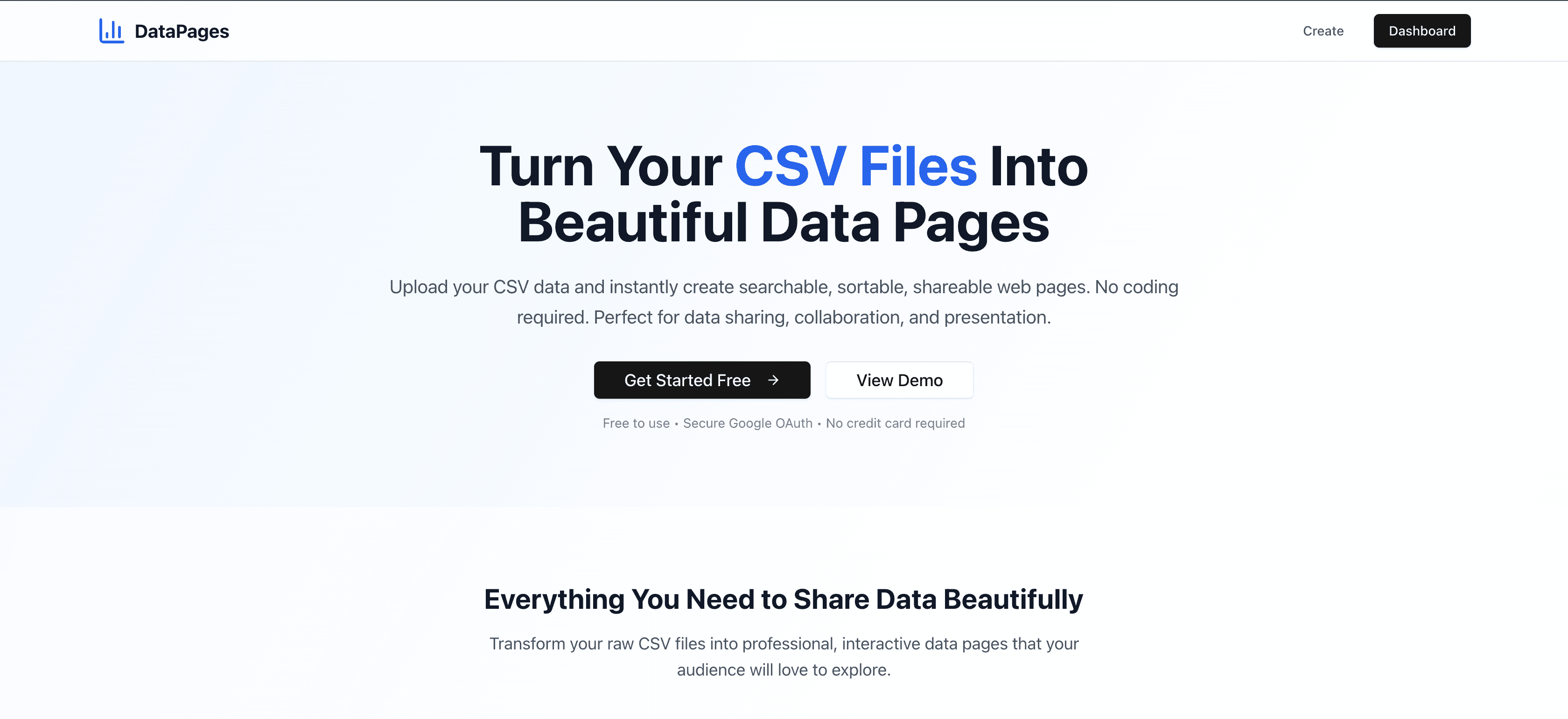
# DataPages

Convert CSV files into beautiful, searchable, sortable data pages with Google authentication and comprehensive analytics.

## Features

- 🔐 **Google OAuth Authentication** - Secure user management
- 📊 **CSV Processing** - Upload and categorize CSV data automatically
- 🎨 **Beautiful UI** - Clean, responsive tables with search and sorting
- 🔒 **Privacy Controls** - Private, Semi-Public, and Public access modes
- 📈 **Page View Analytics** - Track views for authenticated and anonymous users
- 🎯 **Smart Notifications** - Modern toast notifications and modal dialogs
- 👑 **Admin Dashboard** - Manage users, view analytics, and system stats
- 🚀 **Production Ready** - Optimized for Vercel deployment with Supabase

## Quick Start

### Local Development

1. **Clone and install:**
   ```bash
   git clone <your-repo>
   cd csv_to_landingpage
   npm install
   ```

2. **Set up Google OAuth:**
   - Go to [Google Cloud Console](https://console.cloud.google.com/)
   - Create a new project or select existing one
   - Enable Google+ API
   - Create OAuth 2.0 Client ID credentials
   - Add authorized redirect URI: `http://localhost:3001/api/auth/callback/google`
   - Copy Client ID and Client Secret

3. **Set up environment variables:**
   ```bash
   cp .env.example .env.local
   ```

   Edit `.env.local` with your values:
   ```bash
   NEXTAUTH_URL=http://localhost:3001
   NEXTAUTH_SECRET=your-secret-here  # Generate with: openssl rand -base64 32
   GOOGLE_CLIENT_ID=your-google-client-id
   GOOGLE_CLIENT_SECRET=your-google-client-secret
   DATABASE_URL="file:./dev.db"
   SUPER_ADMIN_EMAIL=your-email@gmail.com
   ```

4. **Set up database (SQLite for local):**
   ```bash
   npx prisma migrate dev --name init
   # This creates the database and all required tables
   ```

5. **Start development server:**
   ```bash
   npm run dev
   ```
   Open [http://localhost:3001](http://localhost:3001)

6. **Test the application:**
   - Sign in with your Google account
   - Create a data page by uploading a CSV
   - View your dashboard at `http://localhost:3001/dashboard`
   - Access admin dashboard at `http://localhost:3001/admin` (super admin only)

### Production Deployment (Vercel + Supabase)

1. **Set up Supabase database (Recommended):**

   **Create Supabase Project:**
   - Go to [supabase.com](https://supabase.com) and create account
   - Create new project (note: takes ~2 minutes to provision)
   - Go to Settings → Database
   - Copy the connection string (URI format)

   **Alternative Options:**
   - **Neon**: [neon.tech](https://neon.tech) - Free PostgreSQL
   - **Vercel Postgres**: In Vercel dashboard → Storage → Create Database
   - **Railway/PlanetScale**: Other PostgreSQL providers

2. **Deploy to Vercel:**
   ```bash
   # Install Vercel CLI if needed
   npm i -g vercel

   # Deploy
   vercel --prod
   ```

3. **Configure environment variables in Vercel:**

   Go to Vercel Dashboard → Your Project → Settings → Environment Variables:

   ```bash
   NEXTAUTH_URL=https://your-app-name.vercel.app
   NEXTAUTH_SECRET=your-production-secret-here
   GOOGLE_CLIENT_ID=your-google-client-id
   GOOGLE_CLIENT_SECRET=your-google-client-secret
   DATABASE_URL=postgresql://user:password@host/database?sslmode=require
   SUPER_ADMIN_EMAIL=your-email@gmail.com
   ```

4. **Update Google OAuth for production:**
   - Go to Google Cloud Console → Your Project → Credentials
   - Edit your OAuth 2.0 Client ID
   - Add authorized redirect URI: `https://your-app-name.vercel.app/api/auth/callback/google`
   - Save changes

5. **Verify deployment:**
   - Visit your production URL
   - Test Google sign-in
   - Create a data page by uploading a CSV
   - View dashboard at `/dashboard`
   - Access admin dashboard at `/admin` (super admin only)

6. **Run database migrations in production:**

   **Option A: Supabase Dashboard (Recommended)**
   ```sql
   -- Run this SQL in Supabase SQL Editor:

   -- Create PageView table for analytics
   CREATE TABLE IF NOT EXISTS "PageView" (
       "id" TEXT NOT NULL,
       "csvUploadId" TEXT NOT NULL,
       "userId" TEXT,
       "ipAddress" TEXT NOT NULL,
       "userAgent" TEXT,
       "sessionId" TEXT,
       "viewedAt" TIMESTAMP(3) NOT NULL DEFAULT CURRENT_TIMESTAMP,
       CONSTRAINT "PageView_pkey" PRIMARY KEY ("id")
   );

   -- Create indexes
   CREATE INDEX IF NOT EXISTS "PageView_csvUploadId_idx" ON "PageView"("csvUploadId");
   CREATE INDEX IF NOT EXISTS "PageView_userId_idx" ON "PageView"("userId");
   CREATE INDEX IF NOT EXISTS "PageView_viewedAt_idx" ON "PageView"("viewedAt");

   -- Add foreign key constraints
   ALTER TABLE "PageView" ADD CONSTRAINT "PageView_csvUploadId_fkey"
   FOREIGN KEY ("csvUploadId") REFERENCES "CsvUpload"("id") ON DELETE CASCADE ON UPDATE CASCADE;

   ALTER TABLE "PageView" ADD CONSTRAINT "PageView_userId_fkey"
   FOREIGN KEY ("userId") REFERENCES "User"("id") ON DELETE SET NULL ON UPDATE CASCADE;
   ```

   **Option B: API Migration Endpoint**
   ```bash
   # After deployment, call the migration API as an admin:
   curl -X POST https://your-domain.com/api/migrate-pageview
   ```

7. **Fix admin access if needed:**
   ```sql
   -- Run in Supabase SQL Editor to restore admin access:
   UPDATE "User" SET role = 'admin' WHERE email = 'your-email@domain.com';
   ```

   Or use the fix endpoint: `https://your-domain.com/api/fix-admin`

8. **Verify deployment:**
   - Visit your production URL and sign in
   - Create a data page by uploading a CSV
   - Check dashboard at `/dashboard` - should show view counts
   - Access admin at `/admin` - should show analytics
   - Test page view tracking by visiting data pages

## Admin Management

### Roles & Permissions

- **Super Admin** (set via `SUPER_ADMIN_EMAIL` env var):
  - Full access to admin dashboard
  - Can add/remove other admins
  - Cannot be removed by other admins
  - View all users and CSV uploads

- **Regular Admins** (added via admin dashboard):
  - View admin dashboard and user analytics
  - View all users and CSV uploads
  - Cannot add/remove other admins

### Managing Admins

**Local Development:**
1. Set your email in `.env.local` as `SUPER_ADMIN_EMAIL`
2. Sign in with that email
3. Visit `http://localhost:3001/admin`
4. Use "Manage Admins" section to add other admins

**Production:**
1. Set your email in Vercel env vars as `SUPER_ADMIN_EMAIL`
2. Deploy and sign in with that email
3. Visit `https://your-app.vercel.app/admin`
4. Add other admins by entering their email addresses

**Adding Admins:**
- Users must sign in at least once before being made admin
- Enter their exact Google email address
- They'll immediately gain admin access

**Removing Admins:**
- Only super admin can remove other admins
- Super admin cannot be removed
- Removed admins lose access immediately

## Tech Stack

- **Frontend**: Next.js 15, React 18, Tailwind CSS, shadcn/ui, Lucide React
- **Backend**: Next.js API routes, NextAuth.js (Google OAuth)
- **Database**: Supabase PostgreSQL (prod) / SQLite (dev)
- **ORM**: Prisma with direct client instantiation
- **UI Components**: shadcn/ui (Toast, Dialog, Button, Table, Card)
- **Analytics**: Custom page view tracking with user/anonymous support
- **Deployment**: Vercel with custom domain aliasing
- **Notifications**: Toast notifications and modal confirmations

## Security Features

- **Server-side admin checks** - Admin verification happens on server only
- **Database audit trails** - All admin actions logged to console
- **Secure environment variables** - Sensitive data never exposed to client
- **Google OAuth integration** - Secure authentication with Google
- **Role-based access control** - Super admin vs regular admin permissions
- **Protected API routes** - All admin endpoints require authentication
- **Automatic role sync** - Super admin role automatically assigned

## Analytics & Page View Tracking

### How It Works

- **Automatic Tracking**: Every data page visit is automatically tracked
- **User Types**: Supports both authenticated users and anonymous visitors
- **Deduplication**: Prevents duplicate views within 30 minutes from same user/session
- **Privacy Safe**: Only tracks IP, user agent, and timestamp for anonymous users

### View Analytics

**User Dashboard** (`/dashboard`):
- View counts for each of your data pages
- Total views stat card
- Eye icons showing view numbers

**Admin Dashboard** (`/admin`):
- System-wide view statistics
- View counts for all users' pages
- Analytics breakdowns by access mode

**Data Tracked:**
- Page views with timestamps
- User ID (for authenticated users) or session ID (anonymous)
- IP address (for security/deduplication)
- User agent string (browser info)

## Testing in Development

### Test Analytics Locally

1. **Start development server:**
   ```bash
   npm run dev
   ```

2. **Create test data pages:**
   - Sign in with Google
   - Upload a few CSV files with different privacy settings
   - Note the subdomain names created

3. **Test page view tracking:**
   ```bash
   # Visit data pages in browser
   open http://localhost:3001/subdomain/your-test-page

   # Check dashboard for view counts
   open http://localhost:3001/dashboard

   # Check admin analytics (if admin)
   open http://localhost:3001/admin
   ```

4. **Test different user scenarios:**
   - **Anonymous user**: Visit data pages in incognito mode
   - **Authenticated user**: Sign in and visit pages
   - **Different privacy levels**: Test Private/Semi-Public/Public pages

5. **Verify in database:**
   ```bash
   # Check SQLite database
   npx prisma studio
   # Look at PageView table entries
   ```

### Test Toast Notifications

- **Upload success**: Create new data page → Should show success toast
- **Delete confirmation**: Try deleting uploads → Should show modal dialog
- **Privacy changes**: Change access modes → Should show toast feedback
- **Error handling**: Try invalid operations → Should show error toasts

## Troubleshooting

### Critical Issues We Encountered

**❌ "Failed to read data" / Slow Loading:**
- **Cause**: Broken import paths in API endpoints (`@/lib/auth`, `@/lib/prisma`)
- **Fix**: Use relative imports: `../../auth/[...nextauth]/route` and direct `PrismaClient`
- **Files affected**: Most API routes in `/api/` folders

**❌ "Can't fetch uploads" / Dashboard errors:**
- **Cause**: Invalid `session.user.id` references (NextAuth doesn't include ID by default)
- **Fix**: Use `session.user.email` and lookup user ID from database first
- **Files affected**: `/api/user/uploads/*`, `/api/analytics/views`

**❌ Admin APIs returning 500 errors:**
- **Cause**: Missing functions like `requireAdmin()`, `isAdmin()`, `isSuperAdmin()`
- **Fix**: Implement direct role checks with database queries
- **Files affected**: `/api/admin/*` endpoints

**❌ Page view tracking not working:**
- **Cause**: Missing `PageView` table in database
- **Fix**: Run the migration SQL in Supabase dashboard or use migration API

**❌ Lost admin access after deployment:**
- **Cause**: Admin role not set in database during fixes
- **Fix**: Use `/api/fix-admin` endpoint or update role in Supabase directly

### Common Development Issues

**Database not found in development:**
```bash
# Delete existing migrations and recreate
rm -rf prisma/migrations
npx prisma migrate dev --name init
```

**Import errors during build:**
```bash
# Check for these common issues:
# 1. Broken @/lib/* imports - use relative paths
# 2. Missing PrismaClient instantiation
# 3. Invalid session.user.id references
```

**Page view tracking not appearing:**
```bash
# Check if PageView table exists:
# 1. In Supabase: Go to Table Editor, look for PageView table
# 2. Missing? Run the migration SQL from production setup section
# 3. Check browser network tab for /api/analytics/pageview calls
```

### API Debugging

**Check API endpoint status:**
```bash
# Test if APIs are working:
curl https://your-domain.com/api/user/uploads
curl https://your-domain.com/api/admin/uploads
curl -X POST https://your-domain.com/api/analytics/pageview -d '{"subdomain":"test"}'
```

**Common API Import Fix Pattern:**
```typescript
// ❌ BROKEN - Don't use:
import { authOptions } from '@/lib/auth';
import { prisma } from '@/lib/prisma';
import { requireAdmin } from '@/lib/admin';

// ✅ CORRECT - Use instead:
import { authOptions } from '../../auth/[...nextauth]/route';
import { PrismaClient } from '@prisma/client';
const prisma = new PrismaClient();

// Replace requireAdmin() with:
const user = await prisma.user.findUnique({
  where: { email: session.user.email },
  select: { role: true }
});
if (user?.role !== 'admin') {
  return NextResponse.json({ error: 'Admin required' }, { status: 403 });
}
```

### Production Deployment Checklist

1. ✅ **Database setup**: Supabase project created and connection string copied
2. ✅ **Environment variables**: All vars set in Vercel dashboard
3. ✅ **Google OAuth**: Production redirect URI added to Google Console
4. ✅ **Database migration**: PageView table created via Supabase SQL Editor
5. ✅ **Admin access**: Role set to 'admin' in User table for your email
6. ✅ **Vercel domain**: Custom domain configured and aliased
7. ✅ **Test flow**: Sign in → Upload CSV → Check dashboard → Visit data page → Verify analytics

### Getting Help

**Debugging Steps:**
1. **Check browser console** for client-side errors
2. **Check Vercel function logs** for server-side errors
3. **Test in incognito mode** to rule out browser cache issues
4. **Verify database tables** exist in Supabase Table Editor
5. **Check environment variables** are set correctly in Vercel
6. **Test API endpoints** directly with curl or Postman

**Log Locations:**
- **Client errors**: Browser DevTools → Console
- **Server errors**: Vercel Dashboard → Functions → View Function Logs
- **Database errors**: Supabase Dashboard → Logs
- **Build errors**: Vercel Dashboard → Deployments → View Build Logs

## License

MIT