
Creating Custom Claude Slash Commands
Lover of coding, software development/engineering, indie hackers podcast/community, start-ups, music, guitar, technology, fitness, running, biking, learning new things, travel, the beach, and hiking/mountains.
As a kid I had too many interests. I grew up playing soccer from an early age and played through college! Sports and being a part of a team was always part of my DNA. Not only did I value sports and competition but I loved music, art, drawing, animation, film, computers, math, and learning.
Once I hit college, the decision to choose my life path was paralyzing, and ultimately led me down many different paths. I explored economics, finance, psychology, philosophy, statistics, communications, and marketing. I graduated with a finance degree and thought the data science, statistics, and the trends and patterns would be a fun career, however my first entry level job in the industry discouraged me to continue in the industry and to explore other paths.
I always had an itch to build and start something on my own or with family. Growing up I started a lawn mowing business, shoveling business, lemonade stands, and small Wordpress websites. I loved the creativity of coming up with ideas on how to help people and make money at the same time.
I realized I loved technology, and seeing what could be created and started with technology really urged me to start down the path of learning how to code. My brother and I had an idea for a college social network (similar to Facebook), geared solely towards education and only for students at your college. We wanted to give students the ability to meet people on campus, finding work, organize course material, share notes and materials, find extracurricular activities, sell textbooks and furniture. I took it upon myself to learn how to build something like that. Basically taking an idea and making it happen. I learned about software development, coding languages, web frameworks, startups, marketing all on my own.
I took online free courses, watched videos and tutorials about Django, Python, Javascript, HTML, and databases. I absolutely loved everything about the process. Seeing my work come to life and seeing people use what I created. It satisfied everything that I enjoyed growing up. The creativity, the design, artwork, coming up with a business, learning new things at my own pace, however I learned best, and working with my brother. I did all this while working full-time at a financial institution during my nights and weekends.
We finally launched StudentGrounds, however after a year and 200 user signups later it slowly died down. This experience of taking an idea and learning everything needed to make it a reality basically propelled my interest in learning how to code and do that full time. I learned all about computer science, taking a certificate course at night at a local university. I started another project idea on the side for an event management application for my father's youth soccer tournament, and started applying to every technology company I could think of. I ultimately got my first software engineer job at a small start up in Boston as an apprentice/intern and learned on the job before getting my first full-time software engineer position at a large Boston e-commerce company. My goal there was to learn as much as I could from season professionals, and learning how the corporate world works in terms of software development.
My ultimate goal is to create something on my own doing something I love, as well as enjoy life, and give back to others through education.
Right now I am a full-time Software Engineer with 6 years in the marketing tech space, trying to finish a SaaS boilerplate so that I can spin up any web application for any idea at the click of a button, which will then set me up for my next idea, IdeaVerify, an automated way to verify/validate you're SaaS application idea before actually starting to code and wasting many hours and years developing something that no one would use.
This blog is about my journey navigating the software engineering world, without a CS degree, building in public, keeping record of what I learned, sharing my learnings and at the same time giving back to others, teaching them how to code and giving helpful hints and insights. I am also using this blog to showcase other sides of me such as art, music, writing, creative endeavors, opinions, tutorials, travel, things I recently learned and anything else that interests me. Hope you enjoy!
To create a custom command in Claude Code, you'll need to understand how Claude Code's command system works and follow the proper configuration steps. Let me search for the most current documentation to give you accurate instructions.Based on the official documentation and best practices, here's how to create custom commands in Claude Code:
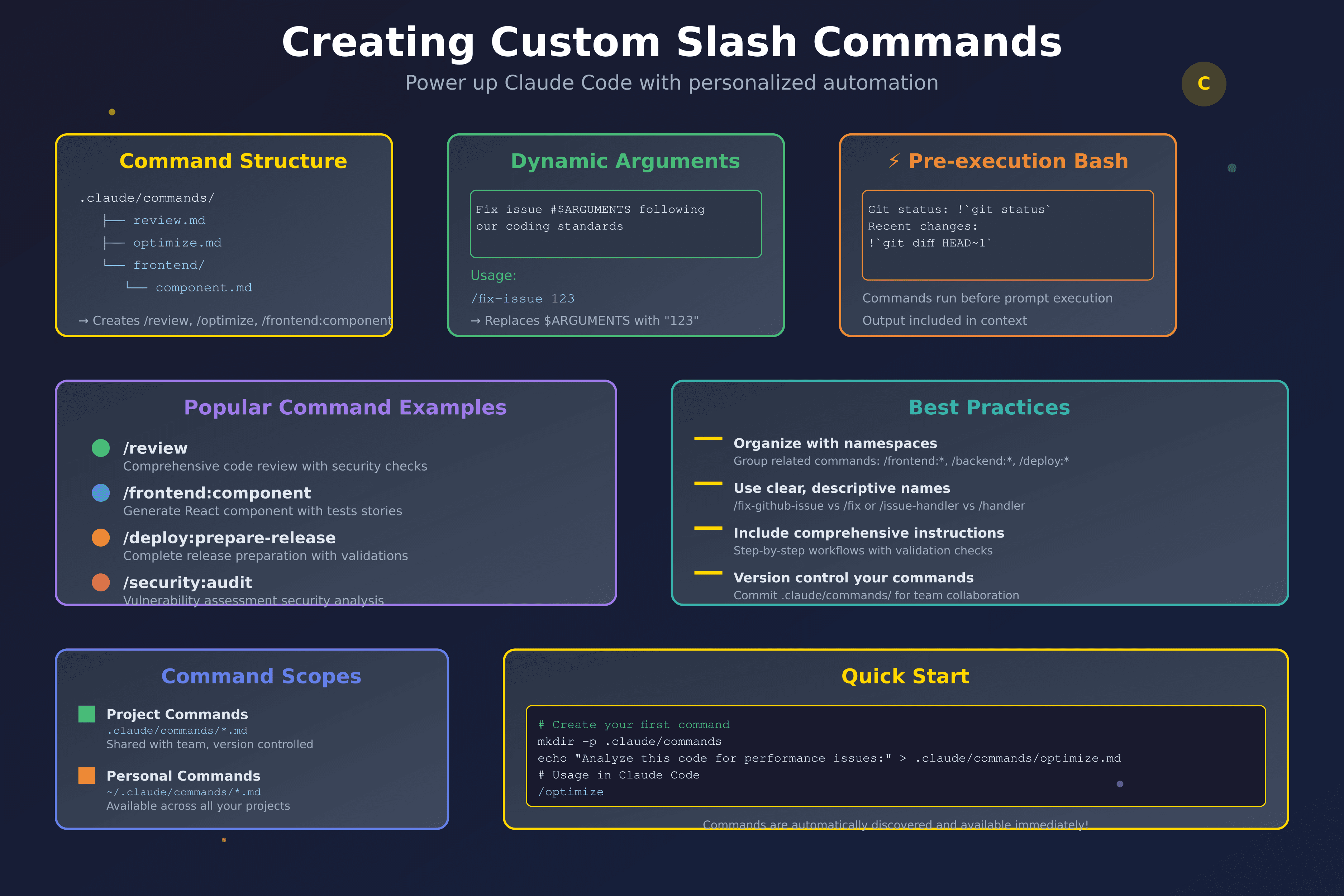
Creating Custom Slash Commands
1. Command Structure & Location
Custom commands are stored as Markdown files in specific directories:
Project-specific commands:
# Create project commands directory
mkdir -p .claude/commands

# Create a command file
echo "Your command prompt here" > .claude/commands/optimize.md
Personal commands (across all projects):
# Create personal commands directory
mkdir -p ~/.claude/commands

# Create a personal command
echo "Your command prompt here" > ~/.claude/commands/security-review.md
2. Basic Command Example
# Example 1: Basic Code Review Command
# File: .claude/commands/review.md

Perform a comprehensive code review of recent changes:

1. **Code Quality Analysis**
   - Check code follows our TypeScript and React conventions
   - Verify proper error handling and loading states
   - Ensure accessibility standards are met

2. **Security & Performance**
   - Review for security vulnerabilities
   - Check for performance implications
   - Validate input sanitization

3. **Testing & Documentation**
   - Review test coverage for new functionality
   - Confirm documentation is updated
   - Check for breaking changes

4. **Best Practices**
   - Ensure consistent code style
   - Verify proper component structure
   - Check for code duplication

---

# Example 2: Command with Arguments
# File: .claude/commands/fix-issue.md

Analyze and fix GitHub issue #$ARGUMENTS following our coding standards:

1. **Investigation**
   - Use `gh issue view $ARGUMENTS` to get issue details
   - Search codebase for relevant files
   - Identify root cause of the problem

2. **Implementation**
   - Implement solution addressing the root cause
   - Follow our coding conventions and patterns
   - Add appropriate error handling

3. **Testing & Validation**
   - Write comprehensive tests for the fix
   - Run existing test suite to ensure no regressions
   - Verify the fix resolves the original issue

4. **Documentation**
   - Update relevant documentation
   - Add code comments where necessary
   - Create clear commit message

Usage: /fix-issue 123

---

# Example 3: Command with Pre-execution Bash Commands
# File: .claude/commands/commit-review.md

---
allowed-tools: Bash(git add:*), Bash(git status:*), Bash(git commit:*), Bash(git diff:*)
description: Review and commit changes with comprehensive analysis
---

## Context
- Current git status: !`git status`
- Current git diff (staged and unstaged changes): !`git diff HEAD`
- Current branch: !`git branch --show-current`
- Recent commits: !`git log --oneline -5`

## Review Process
1. **Change Analysis**
   - Analyze all modified files for quality and consistency
   - Check for potential breaking changes
   - Verify all changes align with the intended feature/fix

2. **Testing Verification**
   - Ensure all tests pass before committing
   - Verify new functionality has appropriate test coverage
   - Check for any test-related changes needed

3. **Commit Creation**
   - Create descriptive commit message following conventional commits
   - Stage appropriate files for commit
   - Execute commit with proper formatting

---

# Example 4: Namespace Organization
# File: .claude/commands/frontend/component.md

Create a new React component following our design system:

1. **Component Structure**
   - Generate TypeScript component with proper props interface
   - Include proper JSDoc documentation
   - Follow our naming conventions (PascalCase)

2. **Styling & Accessibility**
   - Use Tailwind CSS classes following our design tokens
   - Include proper ARIA attributes
   - Ensure keyboard navigation support

3. **Testing Setup**
   - Create component test file with basic render test
   - Include accessibility testing with jest-axe
   - Add story file for Storybook documentation

Usage: /component ButtonVariant
Creates: components/ButtonVariant.tsx, tests, and stories

---

# Example 5: Advanced Workflow Command
# File: .claude/commands/deploy/prepare-release.md

---
allowed-tools: Bash(*), Git(*), Node(*)
description: Prepare complete release package with all validations
---

## Pre-Release Checklist
- Current version: !`cat package.json | grep version`
- Git status: !`git status --porcelain`
- Last release: !`git tag -l --sort=-version:refname | head -1`
- Branch: !`git branch --show-current`

## Release Preparation Process

1. **Code Quality Validation**
   - Run full test suite and ensure 100% pass rate
   - Execute linting and type checking
   - Verify no console.log or debugging statements
   - Check for TODO/FIXME comments that need addressing

2. **Documentation Updates**
   - Update CHANGELOG.md with new features and fixes
   - Verify README.md reflects current functionality
   - Update API documentation if applicable
   - Check that all examples in docs still work

3. **Version Management**
   - Analyze changes to determine version bump (major/minor/patch)
   - Update package.json version following semantic versioning
   - Create git tag with version number
   - Update any version references in code/docs

4. **Build & Package Verification**
   - Create production build and verify no errors
   - Test build artifacts in clean environment
   - Verify bundle size hasn't increased unexpectedly
   - Run integration tests against production build

5. **Security & Dependencies**
   - Run security audit on dependencies
   - Check for outdated packages that need updates
   - Verify no sensitive information in build artifacts
   - Validate environment variable usage

6. **Release Notes Generation**
   - Generate comprehensive release notes
   - Include breaking changes with migration guides
   - List new features with usage examples
   - Document bug fixes and performance improvements

---

# Example 6: Project Bootstrapping Command
# File: .claude/commands/init/new-feature.md

Bootstrap a new feature branch with complete setup:

## Feature Setup Process

1. **Branch Management**
   - Create feature branch from main/develop
   - Set up branch protection if needed
   - Configure tracking for remote branch

2. **Directory Structure**
   - Create feature-specific directories
   - Set up component/service/test folder structure
   - Add index files for clean imports

3. **Boilerplate Generation**
   - Generate initial component files
   - Create test files with basic structure
   - Set up API service files if needed
   - Add TypeScript interfaces/types

4. **Configuration**
   - Update routing configuration
   - Add feature flag if applicable
   - Update module exports
   - Configure any feature-specific settings

5. **Documentation**
   - Create feature documentation file
   - Add to project roadmap/feature list
   - Update architectural decision records
   - Create initial user stories/requirements

Usage: /new-feature user-dashboard
Creates complete feature branch setup

---

# Example 7: Debug Analysis Command
# File: .claude/commands/debug/analyze-error.md

Comprehensive error analysis and resolution:

## Error Investigation Process

1. **Error Context Gathering**
   - Capture full error stack trace and context
   - Identify error occurrence patterns (when/where/how often)
   - Check recent changes that might have introduced the issue
   - Gather user reports and reproduction steps

2. **Code Analysis**
   - Trace error source through call stack
   - Identify all code paths leading to the error
   - Check for similar patterns elsewhere in codebase
   - Analyze error handling in affected areas

3. **Environment Investigation**
   - Check if error is environment-specific
   - Verify configuration settings
   - Analyze logs for additional context
   - Check external service dependencies

4. **Solution Development**
   - Propose multiple solution approaches
   - Evaluate pros/cons of each approach
   - Implement most appropriate solution
   - Add preventive measures for similar issues

5. **Validation & Testing**
   - Create test cases that reproduce the original error
   - Verify fix resolves the issue
   - Test edge cases and error boundaries
   - Ensure no regressions introduced

6. **Documentation & Prevention**
   - Document the issue and solution
   - Update error handling patterns
   - Add monitoring/alerting if needed
   - Share learnings with team

---

# Example 8: Performance Optimization Command
# File: .claude/commands/performance/optimize.md

---
allowed-tools: Bash(npm:*), Bash(yarn:*), Node(*)
description: Comprehensive performance analysis and optimization
---

## Current Performance Baseline
- Bundle size: !`du -sh dist/ 2>/dev/null || echo "No build found"`
- Dependencies: !`npm list --depth=0 | wc -l`
- Test performance: !`npm test -- --verbose 2>/dev/null | grep "Time:" || echo "Run tests first"`

## Performance Optimization Process

1. **Bundle Analysis**
   - Analyze bundle size and composition
   - Identify largest dependencies and modules
   - Find duplicate dependencies
   - Check for unused code and dead imports

2. **Code Optimization**
   - Review component render performance
   - Optimize expensive operations and calculations
   - Implement proper memoization strategies
   - Check for memory leaks and cleanup issues

3. **Asset Optimization**
   - Optimize images and static assets
   - Implement proper caching strategies
   - Minimize and compress resources
   - Use appropriate image formats and sizes

4. **Network Performance**
   - Optimize API calls and data fetching
   - Implement proper loading states
   - Add request caching where appropriate
   - Minimize network round trips

5. **Runtime Performance**
   - Profile component re-renders
   - Optimize state management
   - Implement virtual scrolling for large lists
   - Optimize animations and transitions

6. **Performance Monitoring**
   - Set up performance metrics tracking
   - Add performance budgets to CI
   - Create performance regression tests
   - Document performance guidelines

---

# Example 9: Security Audit Command
# File: .claude/commands/security/audit.md

---
allowed-tools: Bash(npm:*), Bash(git:*), Node(*)
description: Comprehensive security audit and vulnerability assessment
---

## Security Baseline
- Dependency vulnerabilities: !`npm audit --audit-level=moderate 2>/dev/null || echo "Run npm audit"`
- Git history check: !`git log --oneline -10`
- Environment check: !`env | grep -E "(KEY|TOKEN|SECRET|PASSWORD)" | wc -l`

## Security Audit Process

1. **Dependency Security**
   - Run npm/yarn security audit
   - Check for known vulnerabilities in dependencies
   - Review dependency update requirements
   - Analyze dependency trust and maintenance status

2. **Code Security Analysis**
   - Scan for hardcoded secrets and credentials
   - Review authentication and authorization logic
   - Check input validation and sanitization
   - Analyze SQL injection and XSS vulnerabilities

3. **Configuration Security**
   - Review environment variable usage
   - Check for exposed configuration files
   - Validate security headers and policies
   - Review CORS and CSP configurations

4. **Infrastructure Security**
   - Review deployment security configurations
   - Check for exposed endpoints and services
   - Validate SSL/TLS implementation
   - Review access controls and permissions

5. **Data Protection**
   - Review data handling and storage practices
   - Check for PII data exposure
   - Validate encryption implementation
   - Review data backup and recovery procedures

6. **Security Documentation**
   - Update security guidelines and procedures
   - Document security decisions and rationale
   - Create incident response procedures
   - Generate security compliance reports

Usage: /security:audit
Performs complete security assessment of codebase
3. Advanced Command Features
Using Arguments with $ARGUMENTS
Commands can accept dynamic parameters:
# Create command with arguments
echo 'Fix issue #$ARGUMENTS following our coding standards' > .claude/commands/fix-issue.md

# Usage in Claude Code
/fix-issue 123
Namespace Organization
Organize commands into subdirectories for better structure:
# Creates namespaced commands
mkdir -p .claude/commands/frontend
mkdir -p .claude/commands/backend
mkdir -p .claude/commands/deploy

# Usage becomes:
# /frontend:component
# /backend:api-endpoint
# /deploy:staging
Pre-execution Bash Commands
Commands can run bash commands before execution using ! prefix:
---
allowed-tools: Bash(git status:*), Bash(git diff:*)
description: Review with git context
---

## Context
- Current status: !`git status`
- Recent changes: !`git diff HEAD~1`

[Rest of command...]
4. Command Management
Listing Available Commands
# See all available commands
/help

# Commands show their scope:
# (project) - Project-specific commands
# (user) - Personal commands across all projects
# (project:namespace) - Namespaced project commands
Command Discovery
Claude Code automatically discovers:
.claude/commands/*.mdfiles in your project~/.claude/commands/*.mdfiles in your home directoryCommands from connected MCP servers
5. Best Practices
Command Structure
Use clear, descriptive filenames
Include comprehensive instructions
Add usage examples
Specify required tools/permissions
Organization Tips
Group related commands in namespaces
Use consistent naming conventions
Document command purposes and workflows
Keep commands focused on single responsibilities
Team Collaboration
Commit
.claude/commands/to version controlDocument team-specific commands
Create project-specific workflows
Share successful command patterns
6. Real-World Examples
Linear Integration Command
# .claude/commands/linear/create-tasks.md
echo 'Convert this feature description into Linear tasks: $ARGUMENTS

1. Break down into granular tasks
2. Assign priorities and estimates
3. Create tasks in Linear via API
4. Set up proper labels and assignments
5. Link related tasks and dependencies' > .claude/commands/linear/create-tasks.md

# Usage: /linear:create-tasks "Build user authentication system"
AI-Powered Code Generation
# .claude/commands/ai/generate-component.md
echo 'Generate a complete React component: $ARGUMENTS

1. Create TypeScript component with props interface
2. Add comprehensive JSDoc documentation
3. Include accessibility attributes
4. Generate test file with coverage
5. Create Storybook stories
6. Add to component index exports' > .claude/commands/ai/generate-component.md

# Usage: /ai:generate-component "UserProfile with avatar and edit functionality"
Custom commands in Claude Code are incredibly powerful for automating repetitive workflows, ensuring consistency across your team, and creating reusable patterns that evolve with your project. They're essentially prompt templates that become part of your development toolkit!